When managing source code in Git, choosing the right branching strategy is crucial for team collaboration, release management, and overall development efficiency. Two of the most widely used approaches are Git Flow and Trunk-Based Development (TBD). Each comes with its own set of advantages and trade-offs, making it essential to align your choice with your team’s workflow and project goals. Let’s dive into both strategies to help you make an informed decision.
📍Git Flow: A Structured and Controlled Approach
Git Flow, introduced by Vincent Driessen, is a well-defined workflow that organizes development into multiple long-lived branches. This structure helps teams manage different stages of development and release cycles with clarity.
Key Branches in Git Flow:
- Main Branch (main): Contains production-ready code.
- Develop Branch (develop): The primary integration branch where features are merged before an official release.
- Feature Branches (feature/*): Temporary branches created from develop for implementing new features. Once completed, they are merged back into develop.
- Release Branches (release/*): Created from develop when preparing for a release. These branches allow final testing and bug fixes before merging into main
- Hotfix Branches (hotfix/*): Used for critical production issues. These branches are created from main, fixed, and merged back into both main and develop.
What CI/CD code looks like?
.github/workflows/gitflow-release.yaml
name: "GitFlow Release Workflow"
  on:
   push:
     branches:
       - develop
       - release
       - main
  jobs:
    release:
      name: Release the container image to the right environment GitFlow style
      runs-on: ubuntu-latest
      steps:
        - name: Dev release
          if: ${{ github.ref_name == 'develop' }}
          run: |
            # Do a dev release

        - name: QA release
          if: ${{ github.ref_name == 'release' }}
          run: |
            # Do a QA release, before going forward to production

        - name: Prod release
          if: ${{ github.ref_name == 'main' }}
          run: |
            # Do a Prod release
When to Use Git Flow?
Works well for teams following pre-arranged release cycles, such as monthly, quarterly or every 6 months.
Challenges of Git Flow
- Overhead of managing multiple branches and resolving merge conflicts.
- Can slow down continuous integration (CI) and continuous deployment (CD) due to longer-lived branches.
- Less suited for teams that need fast iteration and frequent releases.
📍Trunk-Based Development: Fast and Agile
Trunk-Based Development (TBD) takes a leaner, more agile approach, focusing on a single long-lived main branch. Instead of maintaining multiple branches, developers work in short-lived feature branches, merging them back into mainas quickly as possible.
- Developers create small feature branches directly from main.
- Features are implemented and merged back into main within hours or days.
- Continuous Integration (CI) ensures main remains stable and deployable at all times.
- Feature flags allow unfinished features to be safely merged without impacting production.
- Deployments happen directly from main, with releases tagged as needed.
What CI/CD code looks like?
.github/workflows/tbd-release.yaml
name: "TBD Release Workflow"
on:
  push:
     branches:
      - main

  pull_request:
    types: [opened, synchronize, reopened]
    branches:
      - main

  release:
    types: [released]

jobs:
  release:
    name: Release the container image to the right environment TBD style
    runs-on: ubuntu-latest
    steps:
      - name: Dev release
        if: ${{ github.event_name  == 'pull_request' }}
        run: |
          # Do a release to shared dev environment, or to preview
          # environment created for this feature branch.

      - name: QA release
        if: ${{ github.ref_name == 'main' }}
        run: |
          # Do a QA release, before going forward to production

      - name: Prod release
        if: ${{ github.event_name == 'release' }}
        run: |
          # Do a Prod release
When to Use Trunk-Based Development?
- Ideal for teams that prioritize speed and agility, releasing to production often. These teams do not wait until a release cycle to complete, they ship their features to production whenever the feature becomes ready.
- Best suited for continuous integration and continuous deployment (CI/CD) pipelines.
- Minimizes merge conflicts by keeping branches short-lived and focused.
Challenges of Trunk-Based Development
- Requires strong developer discipline and robust automated testing.
- May be difficult in highly regulated industries where strict release approvals are required.
- Teams unfamiliar with CI/CD might struggle with keeping main stable at all times.
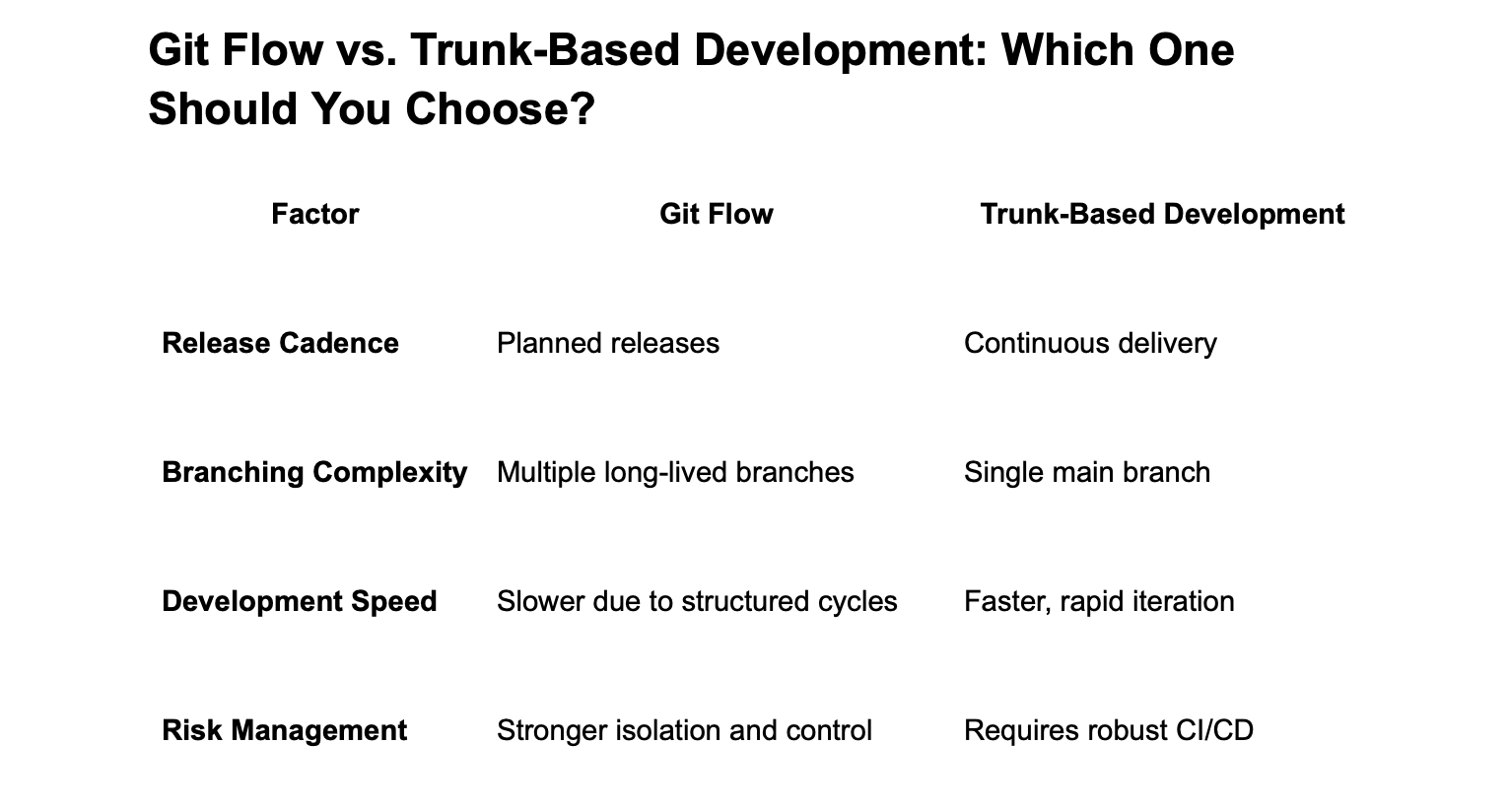
Git Flow vs. Trunk-Based Development: Which One Should You Choose?
Final Thoughts
Both Git Flow and Trunk-Based Development have their strengths. If your team follows pre-arranged release cycles, Git Flow can be a good choice. However, if you prioritize speed, continuous delivery, and frequent releases, Trunk-Based Development will likely serve you better. The right strategy depends on your team’s workflow, release requirements, and level of automation.
Which branching strategy does your team use? Share your thoughts via email! 🙌🏻